🌐 中文 English
This article aims to introduce two methods for deploying Deepseek-R1 on a computer using Docker. (This article involves accessing the official Docker repository and the Chrome Web Store, please ensure your network connection is stable.)
What is Deepseek-R1
Deepseek-R1 is an open-source LLM developed by the Chinese AI company DeepSeek. Its official benchmark test results are as follows:
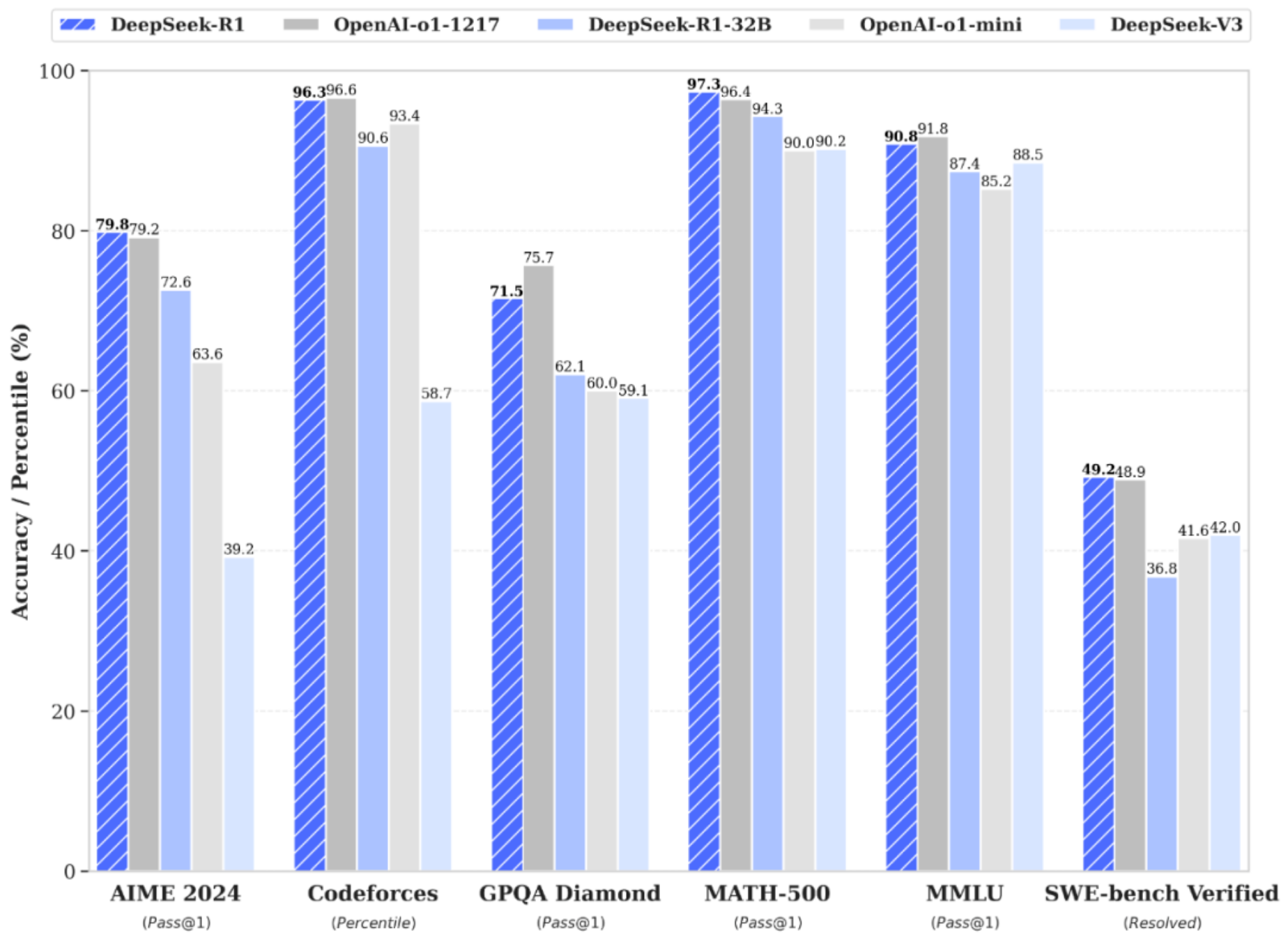 As can be seen, it has capabilities comparable to ChatGPT-o1 in multiple domains. Its performance in tasks such as mathematics, coding, and natural language reasoning rivals that of the official OpenAI o1 release. Therefore, we can deploy it on a computer using Docker as a personal LLM assistant.
(Official paper link: https://github.com/deepseek-ai/DeepSeek-R1/blob/main/DeepSeek_R1.pdf)
As can be seen, it has capabilities comparable to ChatGPT-o1 in multiple domains. Its performance in tasks such as mathematics, coding, and natural language reasoning rivals that of the official OpenAI o1 release. Therefore, we can deploy it on a computer using Docker as a personal LLM assistant.
(Official paper link: https://github.com/deepseek-ai/DeepSeek-R1/blob/main/DeepSeek_R1.pdf)
Installation Requirements
Hardware Requirements
Currently, laptop GPUs are mainly NVIDIA’s RTX 4060 and RTX 4070. The 50 series has not yet been widely adopted in laptops. The VRAM size is typically 8GB, which is sufficient to install the deepseek-R1:7b or 8b versions. If your hardware is below this specification, it is recommended to install the deepseek-R1:1.5b version.
Software Requirements
I am installing the version for nvidia GPU. Therefore, you need to have an nvidia GPU with the nvidia GPU drivers installed, and have docker desktop and WSL set up. If you are unsure how to install these, please refer to the article I wrote previously.
How to Install deepseek-R1
I am using ollama for installation and provide the following two methods:
web-ui
I have described how to install it in my previous article, so I won’t elaborate too much here. However, if you are installing the latest version of ollama web-ui, you need to use a new method to download the model:
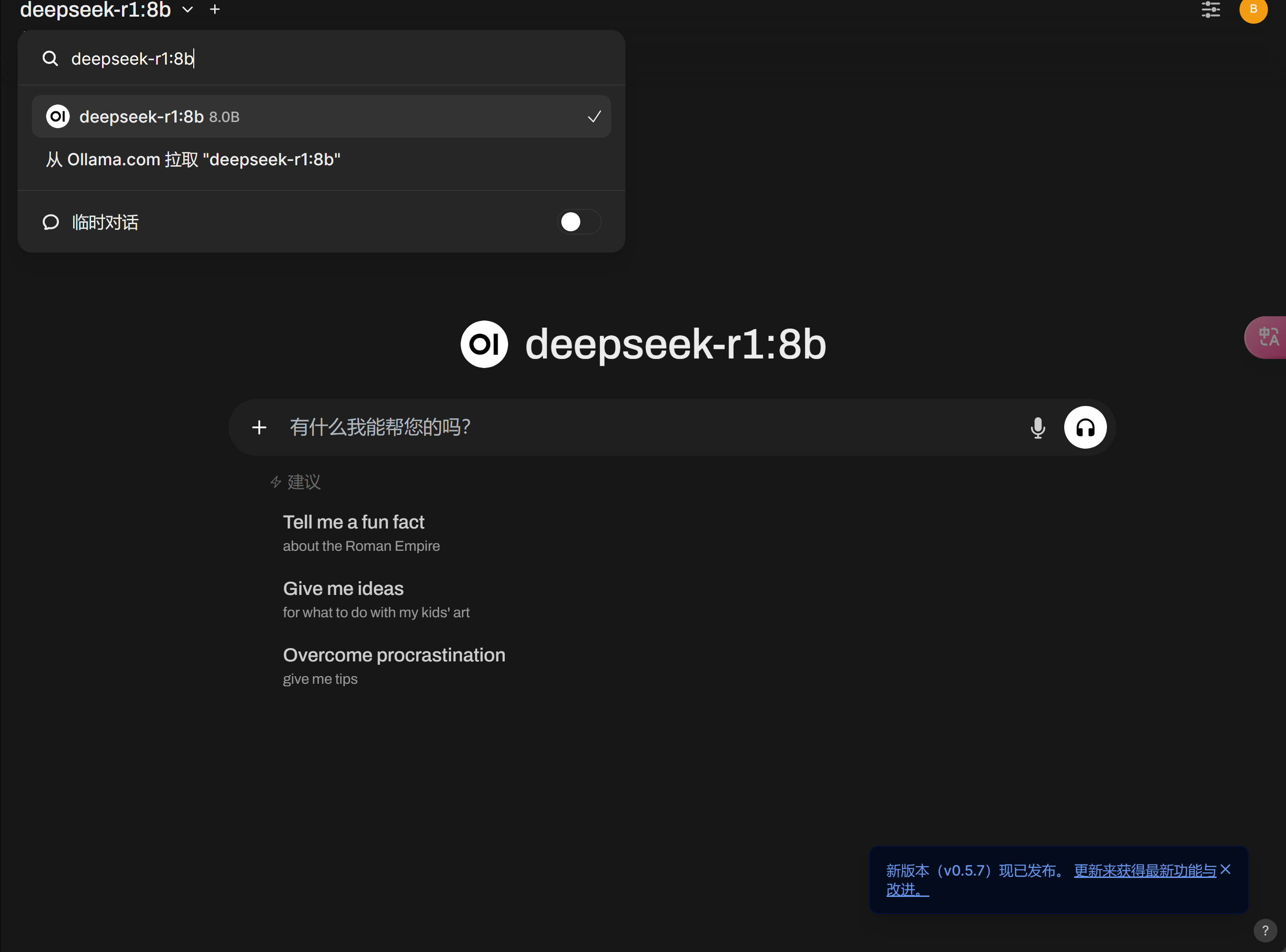 Click on ‘Pull from Ollama.com’ above to automatically complete the download.
page assist
This is a Chrome extension that can display an LLM icon on web pages.
- Run this command in cmd (ensure NVIDIA drivers are present):
docker run -d --gpus=all -v ollama:/root/.ollama -p 11434:11434 --name ollama ollama/ollamaThis downloads the ollama image and deploys it in Docker. - Download the
Page Assistextension from the Chrome Web Store and set its Ollama URL to:http://127.0.0.1:11434 - Use
docker exec -it ollama ollama run deepseek-r1:8bto download thedeepseek-r1:8bLLM. - Return to the
Page Assistextension, select thedeepseek-r1:8bmodel, and you can start using it.
Summary
The above are the methods for deploying Deepseek-R1 on a laptop. I hope this is helpful to everyone.
